Community guide · Not an official ECI or Government website
Maharashtra's voter roll revision, explained plainly.
The Special Intensive Revision (SIR) 2026 is re-checking every voter in Maharashtra against the state's 2002 electoral roll. We have put this guide together so you can complete your part of the process without guesswork — online or in person, at your own pace.
Where things stand today
Loading…
Where things stand
The revision runs in overlapping stages between June and October 2026. The marker below moves automatically — it reflects today's date.
Filling the SIR Enumeration Form
The official physical form distributed by BLOs is printed in Marathi. To make it easy to understand and fill, here is the official English version of the form (provided purely for reference and translation help). The actual physical form to be submitted must be collected directly from your Booth Level Officer (BLO).
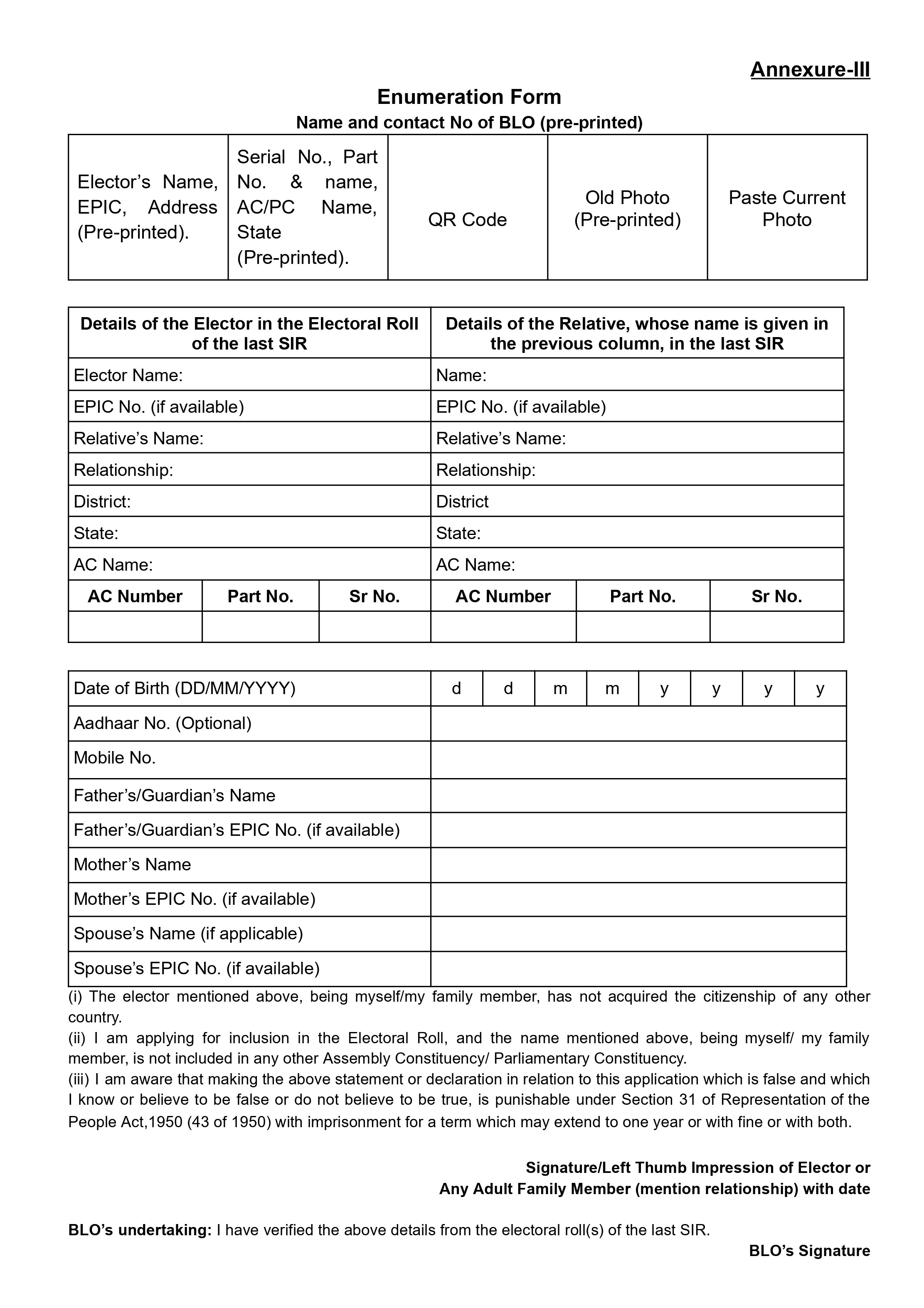
Reference A4 Form (Annexure-III). This English version is for reference only; the actual physical form must be collected from your BLO.
You are permitted to fill out and submit this form in either English or Marathi.
The top half of the form links you back to the historical 2002 electoral roll. This must be filled using details found on the ECI portal's "Search Your Name in Last SIR" utility at voters.eci.gov.in.
- If you are in the 2002 list: Fill in the Left Column ("Details of the Elector in the Electoral Roll of the last SIR").
- If you are NOT in the 2002 list: Leave the left column blank and fill in the Right Column ("Details of the Relative...") with details of your father, mother, grandfather, or grandmother who is listed in the 2002 roll.
- Critical Note: Enter all names and numbers exactly as they appear in the 2002 record, even if there are spelling mistakes or outdated details.
From the Date of Birth field downwards, enter details representing you today.
- All fields (Date of Birth, Aadhaar, Mobile, Parents' details) must match your current Voter ID (EPIC) and modern records.
Attach a passport-size photograph satisfying these strict ECI rules:
- Must have a clean, solid white background.
- Your face must be centered, looking straight ahead with both ears clearly visible.
Offline Path: Obtain the physical form from your Booth Level Officer (BLO), fill it out, sign or add your left thumb impression, and submit it directly to your Booth Level Officer (BLO) during their field visit.
Online Path: Use these exact same rules and mappings when navigating the digital step-by-step forms on the portal.
Which path is right for you?
The whole process comes down to one question. Answer it and we'll show you exactly what to do next.
Looking for official step-by-step guidance? Read CEO Maharashtra's Official Guide on Online & Offline Form Submission →
Does the name on your Aadhaar card exactly match the name on your Voter ID (EPIC) — no extra initials, titles like "Dr." or "Shri", or spelling differences?
Sign up or log in
Go to voters.eci.gov.in. New users sign up with an active mobile number and OTP; returning users log in with their mobile number or EPIC.
Open "Fill Enumeration Form"
It's the main action on your dashboard once you're logged in.
Fetch your current details
Select Maharashtra, enter your EPIC number, and let the portal pull up your existing voter record.
Link your mobile number, if asked
If your number isn't linked to your EPIC, you'll be sent to Form 8 to fix that first, then brought back here.
Map yourself to the 2002 roll
Choose whether your own name, or a parent's/grandparent's name, appears in the 2002 SIR roll — or "neither" if you can't find one. Enter the constituency, part/polling station number and serial number; use the portal's "Search Your Name in Last SIR" tool if you don't have these to hand.
Confirm personal details
Father's, mother's or spouse's name is mandatory; a photograph is optional.
Complete Aadhaar e-Sign
Enter your Aadhaar number or VID and the OTP sent to your Aadhaar-linked mobile to digitally sign the form.
Download your acknowledgement
Save the receipt and send it to your local BLO on WhatsApp — a simple way to make sure it's also logged in their field records.
Get the physical Enumeration Form
Your BLO should hand this to you during their household visit. Please note that this physical form is not available to download online and must be collected directly from your Booth Level Officer (BLO). If you do not have it, contact your BLO using the contact details from the ECI website.
Fill in your lineage details
Same information as the online form: your details, and your (or a parent's/grandparent's) 2002 electoral roll reference if you can find one.
Sign or thumbprint it
No supporting documents are needed at this step — just the completed, signed form.
Return it to your BLO
Don't know your BLO? Search your EPIC number at electoralsearch.eci.gov.in to find them.
Confirm it was digitised
A week or so later, log in at voters.eci.gov.in and click "Fill Enumeration Form" again. A message saying your form was already submitted means it's on record; a blank form means it's still pending with your BLO.
Lost your Voter ID, or don't know your EPIC number?
Search by your name, age, district and constituency — or by your registered mobile number — to retrieve your EPIC number and current booth details.
Search electoralsearch.eci.gov.in →Don't know who your BLO is?
The same portal will return your assigned Booth Level Officer's name and contact details once you enter your EPIC number.
Find your BLO →Documents: what you'll need, and when
You do not need to hand over any documents during the door-to-door enumeration visit itself — only the signed form. Documents are required only later, if the ERO issues you an official notice during the Notice Phase / Claims & Objections phase.
12 Documents Specified by the Election Commission of India
If your name or your parents' names are not present in the previous SIR, keep any one of the following documents specified by the Election Commission of India ready:
Birth Certificate
Official birth registration certificate
Passport
Valid Indian Passport
Class 10th (Matriculation) or Educational Certificate
School/College Leaving Certificate or Board Marksheet
Domicile / Residence Certificate
Issued by competent State Government authority
Caste Certificate
Official SC/ST/OBC Certificate issued by Government
Identity Card for Government or Public Sector Undertaking (PSU) Employees / Pensioners
Service Identity Card or Pension Payment Order (PPO)
Family Register of State / Local Authority
Official family registry record
Land or House Allotment Certificate issued by the Government
Government allotment certificate or land deed
Forest Rights Certificate
Issued under Scheduled Tribes & Other Traditional Forest Dwellers Act
Proof of National Register of Citizens (NRC)
Official NRC entry or certificate, where applicable
Identity Card / Certificate issued by a Bank, Post Office, LIC, or Government before July 1, 1987
Issued before 1 July 1987
Aadhaar Card
Note: Aadhaar Card will be accepted only as proof of identity.
What if I'm not in the 2002 database?
Don't panic, and don't assume you'll be quietly removed. If neither your name nor a parent's or grandparent's name can be traced in the digitised 2002 roll, you're logged as an "unmapped" elector rather than deleted outright.
If that means you're missing from the Draft Electoral Roll on 17 August 2026, your Electoral Registration Officer will issue a formal notice. You'll then have until 16 September 2026 to respond with alternate documents — see the checklist above — to establish your identity and continuous residence. Our FAQ page and weekend camp can help you prepare that response.
Who we are & How to get help
Learn more about the Il An Noor Foundation volunteers and discover how to reach us online or visit our camps in person.
Il An Noor Foundation
We're a Navi Mumbai-based community trust that's been fielding SIR questions daily — over WhatsApp and in person at Kharghar — since the revision began. Most people aren't confused about whether to comply; they're confused about the mechanics: which form, which portal, which document, by when.
This site is our attempt to put everything we tell people at camp into one place you can return to, in an order that actually matches how the process unfolds. It's built and maintained independently by our volunteers, not the Election Commission.
Visit ilannoor.org →Live Timeline
Track the active and upcoming stages of Maharashtra's Special Intensive Revision.
Frequently Asked Questions
Searchable answers to what we're actually asked at camp each week.
Official Form Guide
Official instructions from CEO Maharashtra for online & offline form filling.
Official Voter Portal
voters.eci.gov.in — the government's own enumeration portal.
Come see us, or ask online
Two ways to reach us — pick whichever is easier.
Weekend help camp · Walk-in
Bring your documents, we'll sort the forms
- When
- Every Saturday & Sunday, 6:00 – 8:00 PM
- Where
- Il An Noor Library, Sapphire CHS, Sector 35F, Kharghar, Navi Mumbai – 410210
What to bring:
- Physical Voter ID (EPIC) card
- Aadhaar card
- Any birth, education or address documents you have
SIR Q&A WhatsApp Group
A running digital helpdesk for corrections, portal issues, and questions about ECI notices — answered by volunteers and by people going through the same process.
Join the groupSpeak to an organiser
Questions we hear at every camp
Search, or filter by topic, to find the answer you need.
No questions match your search. Try different words, or ask us directly on WhatsApp.